
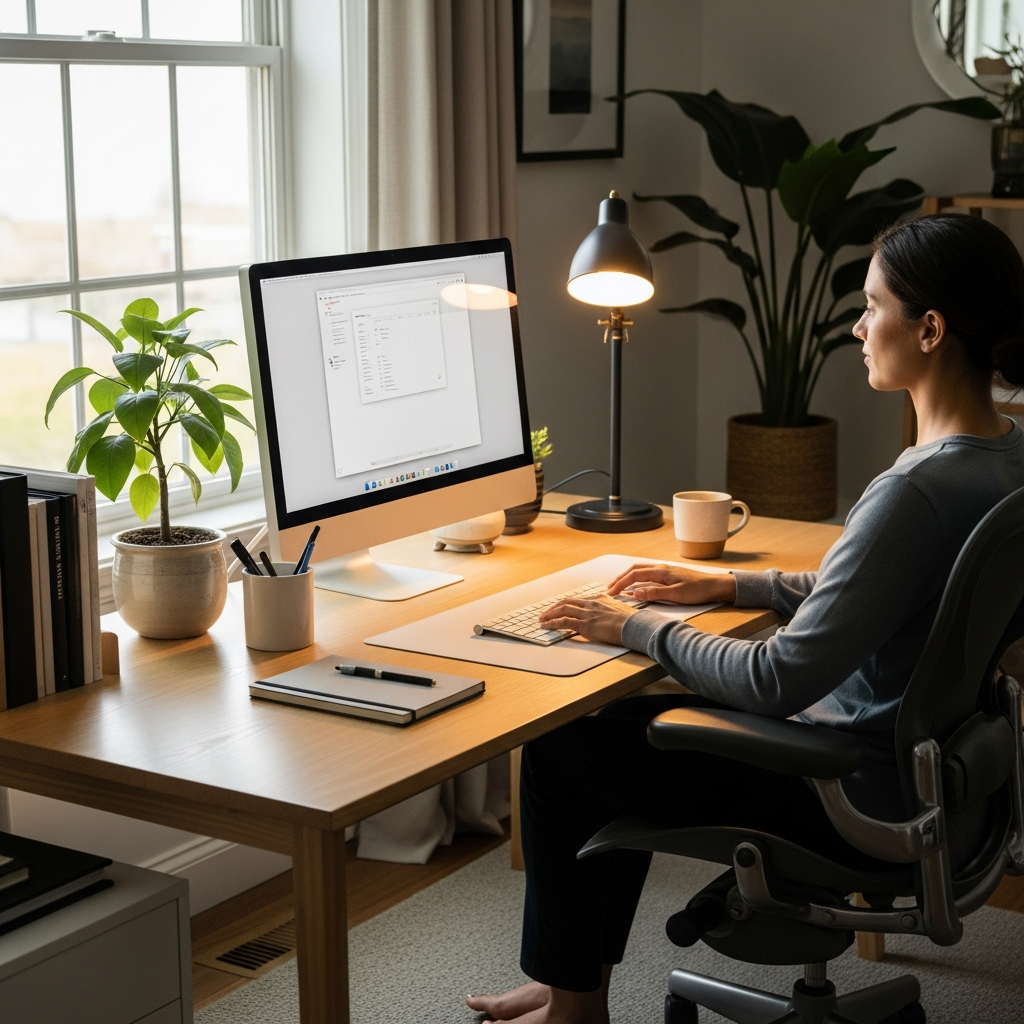
Ergonomic Workspace Lighting: Science-Backed Guide for Eye Health and Focus
Do your eyes feel tired after just a few hours at your desk? You’re not alone. Research shows that 50-90% of computer users experience digital eye strain symptoms. The right ergonomic workspace lighting can reduce these symptoms by up to 50% while boosting productivity and focus. Many people overlook lighting when setting up their workspace, but it’s one of the most critical factors for long-term eye health and work performance. In this comprehensive guide, we’ll explore science-backed principles that transform how you illuminate your workspace.
The Science of Light and Eye Health
Understanding how light affects your eyes is the first step toward creating an optimal workspace. Light influences everything from your circadian rhythms to your ability to focus on detailed tasks. According to the American Optometric Association, proper lighting can significantly reduce eye strain and fatigue.
Color Temperature Matters
Color temperature, measured in Kelvin (K), determines whether light appears warm or cool. For most office work, research suggests that 4000K to 5000K provides the best balance. This range mimics natural daylight and helps maintain alertness without causing excessive strain. Warmer temperatures (2700K-3000K) work better for relaxation areas, while cooler temperatures (5000K+) can increase productivity for short periods.
Lux Levels Explained
Lux measures illumination intensity. The OSHA Lighting Standards recommend 500 lux for general office work and 750-1000 lux for detailed tasks. However, balance is crucial—too much light causes glare, while too little forces your eyes to work harder.
Natural Light Optimization Strategies
Natural light offers numerous benefits for eye health and overall wellbeing. Studies from Harvard Health Publishing show that exposure to natural light during work hours can improve sleep quality and mood. However, improper natural light management can create glare and reflections that worsen eye strain.
Optimal Desk Positioning
Position your desk perpendicular to windows rather than facing directly toward or away from them. This arrangement minimizes glare on your screen while providing balanced illumination. If you’re working on a comprehensive ergonomic workspace setup, consider lighting as a foundational element alongside furniture and equipment placement.
Managing Glare and Reflections
Use adjustable blinds or shades to control incoming sunlight throughout the day. Anti-glare screens and matte monitor finishes can also help reduce reflections. Remember that natural light changes throughout the day, so your lighting setup should be flexible enough to adapt.
Task Lighting Setup for Different Work Activities
Different tasks require different lighting approaches. Understanding these variations helps you create a versatile workspace that supports various activities without causing eye strain.
Reading vs. Computer Work
For reading physical documents, you need brighter, more focused light. For computer work, you need softer, more diffuse lighting that doesn’t create screen glare. The best lighting setup for home office environments includes both ambient lighting and adjustable task lighting.
Desk Lamp Placement Principles
Proper desk lamp placement is crucial for effective task lighting. Position your lamp to the side opposite your writing hand to prevent shadows. The lamp should be positioned so light falls on your work surface without shining directly into your eyes or reflecting off your screen. Adjustable arms and multiple brightness settings offer the most flexibility.
Blue Light Management and Digital Eye Strain Prevention
Blue light from digital screens has received significant attention in recent years. While some blue light exposure is natural and beneficial during daytime hours, excessive exposure from screens can contribute to digital eye strain and disrupt sleep patterns.
Understanding Blue Light Effects
Blue light has shorter wavelengths and higher energy than other visible light. This means it scatters more easily, which can reduce contrast and contribute to digital eye strain. Many people wonder how to reduce eye strain from computer screens, and blue light management is a key component of the solution.
Practical Solutions for Blue Light Reduction
Consider these approaches for managing blue light exposure:
- Use built-in night mode settings on your devices
- Install blue light filtering software
- Consider blue light filtering glasses for extended screen time
- Take regular breaks using the 20-20-20 rule
For comprehensive strategies on managing screen-related discomfort, explore our guide on digital eye strain relief techniques.
Measuring and Adjusting Your Workspace Lighting
Creating optimal lighting requires more than guesswork. Using proper measurement tools and following established standards ensures your workspace meets both comfort and productivity requirements.
Using Light Measurement Tools
Several smartphone apps can measure lux levels in your workspace. For more accurate measurements, consider investing in a basic light meter. Aim for these general guidelines:
- General office work: 300-500 lux
- Detailed tasks (reading, writing): 750-1000 lux
- Computer work: 300-500 lux with minimal screen glare
Creating Balanced Illumination
Avoid creating extreme contrasts between different areas of your workspace. Your monitor should not be significantly brighter or darker than your immediate surroundings. This balance reduces the need for your eyes to constantly adjust, which is a major contributor to fatigue. For optimal results, combine your lighting adjustments with proper monitor setup guide techniques.
Creating Your Personalized Lighting Plan
Now that you understand the principles, it’s time to create your personalized lighting plan. This step-by-step approach ensures you address all aspects of workspace illumination.
Step-by-Step Implementation
Follow these steps to optimize your workspace lighting:
- Assess your current setup: Note problem areas like glare spots or dark corners
- Optimize natural light: Adjust window treatments and desk position
- Add task lighting: Select appropriate lamps for different activities
- Install ambient lighting: Ensure even overall illumination
- Test and adjust: Use light measurements and personal comfort as guides
Budget-Friendly Solutions
You don’t need expensive equipment to improve your workspace lighting. Simple changes can make significant differences:
- Reposition existing lamps for better coverage
- Use daylight bulbs in existing fixtures
- Add inexpensive desk lamps with adjustable arms
- Use white surfaces to reflect and distribute light
Conclusion: Your Path to Better Workspace Lighting
Implementing proper ergonomic workspace lighting is one of the most effective ways to protect your eye health and enhance productivity. Remember these key takeaways:
- Balance natural and artificial light to minimize glare and reflections
- Use appropriate color temperatures (4000K-5000K) for most office work
- Implement the 20-20-20 rule to give your eyes regular breaks
- Measure light levels to ensure they meet recommended standards
- Create a layered lighting approach with ambient, task, and accent lighting
Start today by making one small change to your workspace lighting. Your eyes will thank you, and you may notice improved focus and reduced fatigue. Remember that workspace ergonomics extends beyond lighting—consider exploring our resources on wrist pain relief for comprehensive workspace wellness.
Medical Disclaimer: This article is for informational purposes only and does not constitute medical advice. Always consult a qualified healthcare provider before making changes to your health routine or if you have specific medical concerns.